
Creative Debra
Learning & Systems Designer
I design human-centered learning and operational systems that reduce friction, improve usability, and help people navigate complexity with confidence.
Portfolio
Selected work demonstrating creative direction, systems thinking, and a systems-driven approach to UI consistency, visual hierarchy, and scalable design decisions across long-term product development.
Quick Essay Links
ESSAY
SYSTEMS & INFORMATION DESIGN***The Duplicate Wasn't the Problem
What cleaning up years of inherited information taught me about process, provenance, and designing for reuse***I am currently working inside a collection of tens of thousands of litigation documents accumulated over years of discovery. At first glance, one of the obvious problems is duplication. There are duplicate documents. Triplicates. Sometimes four or five copies of what appears to be the same thing.The instinctive response is obvious: Get rid of the duplicates.Except I can't.They aren't meaningless duplicates. A document may have been produced during discovery by one firm and assigned a Bates number. Later, the same underlying document was produced again and received a different Bates number. Then it happened again.Each copy now carries a piece of the history of the case. The documents may be substantively identical, but their production histories aren't. Deleting the extras would make the collection cleaner while making the record less accurate.So the duplicate isn't really the problem. The process that created it is.***When completing the task becomes the systemPrevious firms handling the material appear to have repeatedly approached discovery production as the task immediately in front of them:1. Find the responsive documents.
2. Prepare them.
3. Produce them.
4. Move on.That's perfectly understandable when everyone is working toward a deadline. But without a process for identifying what had already been produced, preserving an authoritative version, and reusing that material when appropriate, every new production had the opportunity to create another copy.Along the way, useful metadata was repeatedly stripped away. Eventually, the collection stopped behaving like a maintained body of information and started behaving like an accumulation of historical transactions.That's an important distinction. Each individual production may have accomplished exactly what it needed to accomplish. The accumulation of those successful individual actions still created a larger systems problem.That's the kind of problem I find fascinating.***You can't deduplicate historyMy job now isn't simply to clean up filenames. I have to preserve what happened while making the information more usable going forward. That means examining the documents themselves and reconstructing useful metadata from what I can actually see:* What kind of document is this?
* Who authored it?
* Who received it?
* What case does it belong to?
* What is it about?
* When was it created?
* Has it been redacted?
* Is this the same underlying document I've already encountered with another Bates number?
* And, when there are several legitimate production copies, which one should become the authoritative version used for future work?The other copies don't disappear. Their Bates numbers matter. Their provenance matters. But preserving history doesn't require continuing to reproduce its disorder.Historical copies can remain historically true without forcing future work to repeat historical mistakes.***Metadata should tell you somethingOnce I understood the problem, naming conventions stopped being an administrative detail. They became part of the information architecture.Court-filed documents have a strong natural organizing principle: time. Complaints, motions, orders and other filed documents collectively tell the procedural story of a case. So their titles begin with the date:YYYY-MM-DD Document Type Case HeaderWhen the collection is sorted alphabetically, those documents naturally appear chronologically. You can begin to see the case unfold before opening anything.Supporting documents behave differently. Correspondence, emails, faxes, depositions, expert reports, insurance policies, plaintiff and defendant records and similar materials are more useful when grouped first by what they are:Document Type (Redacted, if applicable) Author Short Description Date Recipient Case HeaderNow the same ordinary alphabetical sort produces a different kind of usefulness:* Filed materials rise to the top as a chronology.
* Supporting materials organize themselves below by document type.
* Context remains visible to distinguish items without opening every file.No exotic interface required. No elaborate new technology. Just metadata designed around how someone will need to understand the collection later.***Clean is not the same as simpleThere is a temptation in systems work to treat cleanliness as reduction:
* Fewer files.
* Fewer categories.
* Fewer fields.
* Fewer exceptions.Sometimes that's exactly right. Sometimes it destroys information.This project requires a different kind of clean. I can't make five historically significant copies become one file simply because that would make the folder prettier. Instead, I can:* Make the relationship between those copies understandable.
* Preserve their production history.
* Reconstruct the context that was lost.
* Identify an authoritative version.
* Create a process so that the next person doesn't have to solve the same problem again.Good information architecture doesn't necessarily eliminate complexity. It makes complexity legible.That is a much more useful standard.***The expensive part of missing process comes laterWhat interests me most about this work is that the consequences didn't necessarily appear when the original decisions were made. The cost accumulated quietly.A document gets produced again. Another copy enters the collection. Metadata disappears. Someone later has to determine whether two similarly named PDFs are actually the same. Another production happens. Another Bates number is created.Multiply that across years and tens of thousands of documents and eventually someone inherits a collection whose history is technically preserved but whose structure has become increasingly difficult to understand.This happens far beyond litigation:* Knowledge bases accumulate five versions of essentially the same answer.
* Shared drives fill with: Final Final-v2 Final-USE-THIS Final-Approved Final-Approved-New
* Customer support teams create another document because they can't find the existing one.
* Training recreates information that Operations already documented.
* A new employee writes a guide because the institutional knowledge exists only in someone's head.
* A team migrates platforms and carries the content forward without carrying its context.These look like content problems. Often, they're process problems.The organization has developed a reliable way to create information, but not necessarily a reliable way to recognize, govern, reuse and retire it.***Design for the next useOne question has started following me through this project: What happens the next time someone needs this?Not just: Can I complete today's task?
But: Am I leaving behind something that makes tomorrow's task easier?That's a different design constraint:* An authoritative document can be reused instead of reproduced.
* Reconstructed metadata can prevent someone from having to reopen a document simply to understand what it is.
* A meaningful title can expose relationships that an arbitrary filename hides.
* A consistent classification system can make tens of thousands of documents feel less like tens of thousands of unrelated objects.
* And a documented process can prevent today's solution from becoming tomorrow's archaeology project.None of those improvements is particularly glamorous. That's probably why I like them. The best systems often become almost invisible once they're working.Someone searches. They recognize what they need. They understand what they're looking at. They trust that it's the right thing. They move on.What they don't see are all the decisions that made that possible.***The real goal isn't a cleaner collectionWhen I started looking at this material, it would have been easy to define success as making the dataset cleaner. I don't think that's the goal anymore.The goal is to leave behind a collection that doesn't need someone like me to reconstruct it again five years from now:1. Preserve the history.
2. Recover the context.
3. Establish authority.
4. Design for retrieval.
5. Create a process for reuse.
6. Ensure the next production adds to the system instead of starting over beside it.Because the duplicate was never really the problem. The problem was having no process to prevent the next one.
DESIGN & SYSTEMS THINKING***Is the Kitchen Work Triangle Solving Yesterday's Problem?***Lately I've been thinking about kitchens.Not countertops. Not cabinet colors. Not whether the sink should be under a window.The workflow.For decades we've talked about the kitchen work triangle. The refrigerator, the sink, and the stove form the three points of the triangle, with the idea that reducing the distance between them makes cooking easier.It's a good design pattern. I just wonder if it's solving yesterday's problem.The work triangle assumes a particular way of living. You walk to the refrigerator, grab ingredients, wash them, cook them, and you're done. That probably describes a lot of households. It doesn't describe mine.For me, cooking starts long before I turn on a burner:1. I decide what I'm making.
2. I check the pantry.
3. I pull ingredients from the refrigerator.
4. I wash produce.
5. I dry it.
6. I prep everything.
7. Only then do I start cooking.After dinner comes leftovers, storage, cleanup, and getting everything ready so tomorrow starts a little easier than today.That isn't a triangle. It's a workflow. And workflows deserve to be designed.***The more I thought about it, the more I realized the kitchen isn't really a room. It's a production system.Every movement has a purpose. Every interruption has a cost. Every missing ingredient, every awkward reach, every countertop appliance without a home creates just a little more friction. One moment isn't a big deal. But over thousands of meals, those tiny interruptions become part of everyday life.That's why I keep coming back to one idea:Large, uninterrupted prep space is more valuable than another cabinet.Cabinets store things. Counters are where the work actually happens.The same goes for storage. I don't want more places to put things. I want things to have one obvious place. Coffee equipment. Cleaning supplies. Cat food. Mixing bowls. Holiday serving dishes. If every object has a home, every task asks fewer questions.I think that's true well beyond the kitchen:* Infrastructure should outlive technology.
* Maintenance is part of the design, not something you think about later.
* Accessibility isn't a luxury. It's what allows a system to survive ordinary life.***As I was sketching floor plans, I realized I wasn't really designing a house. I was asking the same questions I've asked throughout my career:* What assumptions are we making?
* Where does friction exist?
* What happens on an ordinary Tuesday?
* What breaks first?
* Who has to maintain this after the excitement wears off?Whether I'm thinking about a kitchen, an onboarding experience, a documentation system, or a piece of software, those questions don't really change. Only the subject matter does.Maybe that's why this stopped feeling like architecture and started feeling like systems design.The kitchen just happened to be where I noticed it.
Enterprise AI Enablement & Up-Skilling
Driving Workflow Productivity Through Human-Centered Learning Design
Estimated Course Duration: 12–15 Minutes (Microlearning Format)
Design Methodology: Systems Thinking, RTCC Prompts, Behavioral Scaffolding
Core Artifact: Interactive HTML Case Study Slide Deck
1. Executive Summary & ChallengeThe Problem Space
Enterprise organizations are investing heavily in advanced Large Language Model (LLM) infrastructures, but software budgets do not automatically equal workforce capability. Most employees approach highly powerful generative models with conversational, single-sentence queries. This lack of structure leads to:• Severe iteration fatigue: Learners abandon prompts early when outputs don't instantly match their intent.
• Low confidence and trust: Users struggle to identify hallucinations, relying on manual rewriting.
• Wasted operational hours: Companies miss out on projected efficiency gains.The Objective
Design and build a scalable, modern, and productized microlearning system that transitions non-technical corporate teams from "chatting with software" to "cooperating with a digital partner."2. Target Audience & Learner PersonaThis program is specifically designed to fit into the workflows of:
• Non-technical business professionals handling heavy administrative documentation.
• Knowledge workers producing marketing content, technical summaries, and customer emails.
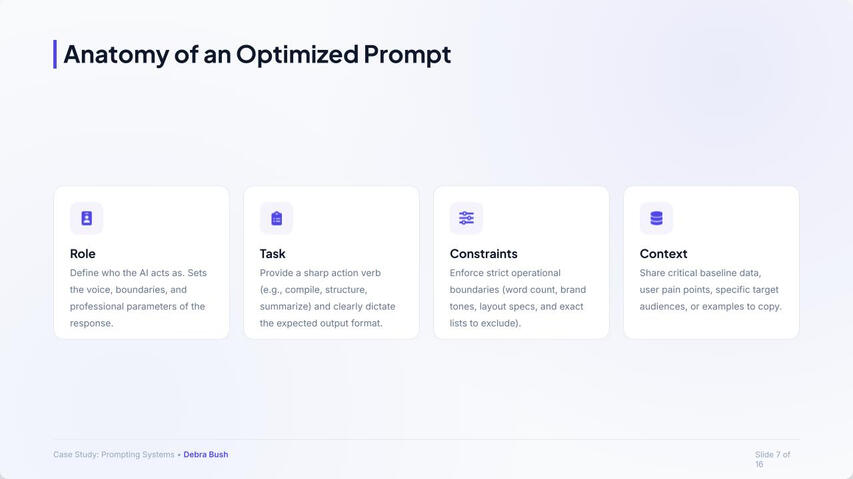
• Customer-facing operations teams requiring standardized, high-volume communication scripts.3. Instructional Architecture: The RTCC FrameworkTo reduce the mental effort needed to write effective instructions, the course introduces a simple, memorable four-part tool:
Role + Task + Constraints + Context
By dividing prompt construction into visual blocks, users can confidently assign appropriate boundaries to the machine:
• Role: Instruct the model on its expert persona.
• Task: Focus the action using strong action verbs (e.g., restructure, summarize).
• Constraints: Enforce style guides, word counts, and language rules.
• Context: Provide key audience backgrounds, background data, or style examples.4. Evidence-Based Design DecisionsWhen building educational materials for modern learners, every layout choices must serve cognitive and business purposes.Choice A: Microlearning Chunking
What: Organizing content into a modular, 12–15 minute asynchronous package.
Why: Corporate learners face time limits. Shorter lessons improve completion rates and fit easily into standard business days.Choice B: Side-by-Side Prompt Contrast
What: Showing side-by-side tables comparing a conversational prompt with an optimized prompt.
Why: Demonstrating the concrete contrast in output quality reinforces the value of applying the framework.Choice C: Active Sandbox Simulators
What: Incorporating an applied multi-state scenario directly into the presentation.
Why: Real-world skill transfer requires active decision-making. By giving learners immediate corrective and constructive feedback, we guide behavior improvement instantly.5. Targeted Business OutcomesWhen evaluated using the Kirkpatrick Model of Training Evaluation, this educational architecture aims to drive:
• Cycle Reductions: Reducing typical prompt cycles from an average of 7.5 iterations down to 3.5.
• Speed Improvements: Decreasing routine workflow execution times by up to an estimated 55%.
• Increased System Adoption: Driving returns on internal enterprise software investments.
• Standardization: Keeping outgoing brand voice consistent across distributed global teams.
Reducing Friction Between Purchase and Product Value
Most onboarding fails because complexity arrives before confidence.
A human-centered onboarding and enablement framework focused on reducing abandonment through confidence-first learning design.
The Problem
Most onboarding systems compete directly with the work users are already trying to accomplish. New employees, customers, and teams often enter unfamiliar systems under time pressure, uncertainty, and competing priorities. When onboarding prioritizes feature exposure over immediate success, users are more likely to disengage before reaching meaningful value. Adoption is not only influenced by product capability. It is heavily influenced by confidence, momentum, and whether users feel capable of succeeding inside the system quickly.
The Framework
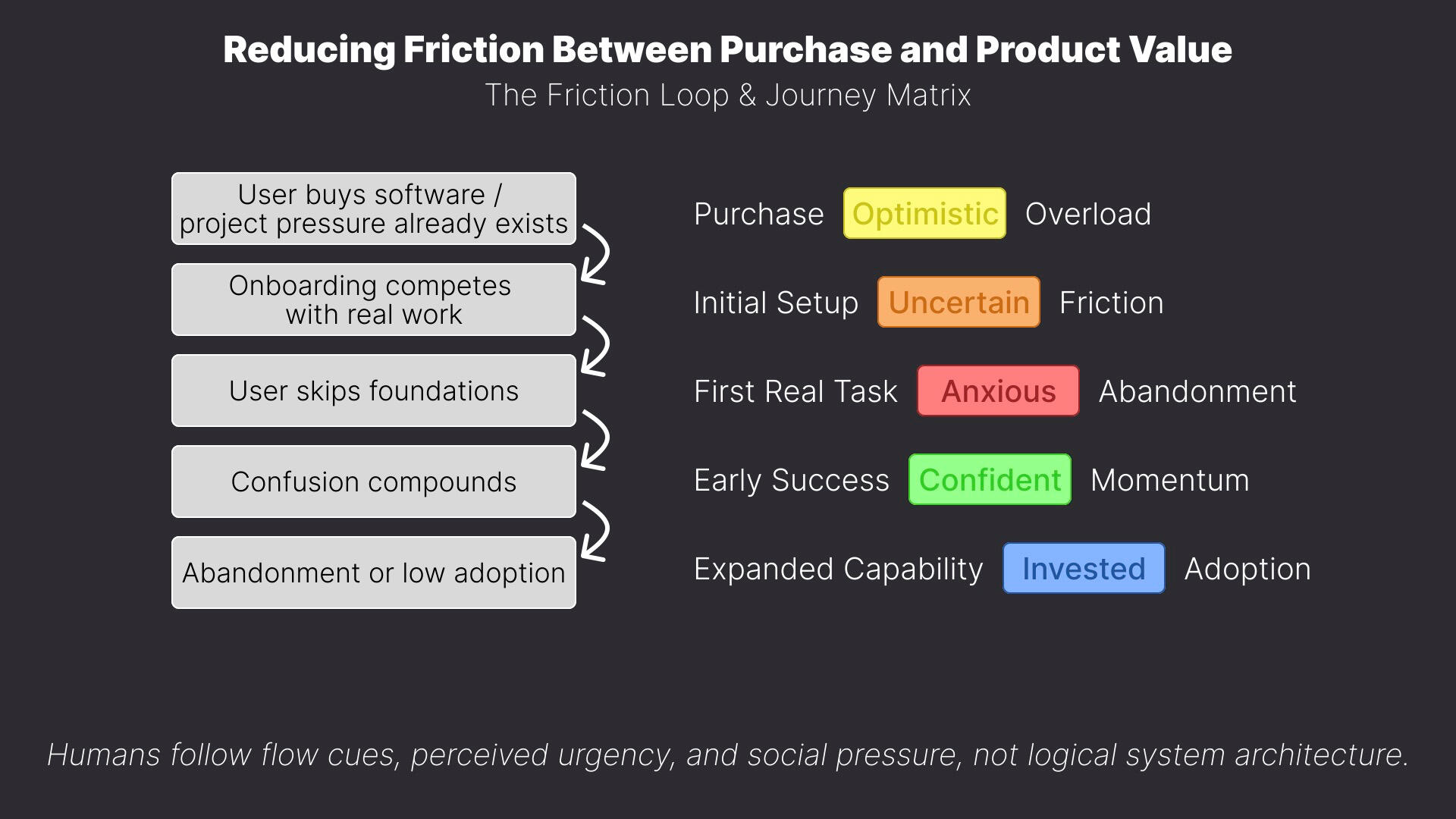
Confidence Before CompliancePeople absorb information differently once they feel capable, welcomed, and emotionally grounded. Confidence Before Compliance prioritizes early momentum and practical familiarity before introducing deeper process, policy, or system complexity.The Friction LoopMost onboarding failures are not caused by unwilling users. They emerge when onboarding competes with real work, pressure, uncertainty, and cognitive overload. The Friction Loop maps how confusion compounds into abandonment before meaningful success occurs.The Right Now Branching ArchitectureThe Right Now Branching Architecture organizes onboarding around immediate user goals instead of feature-first exploration. By helping users accomplish a real task first, systems can introduce additional tools, workflows, and complexity gradually through contextual learning.
View the Onboarding Philosophy in Figma
Key Design Principles
Progressive DisclosureIntroduce complexity gradually as confidence increases. Prioritize immediate usability before exposing advanced workflows, settings, or system depth.Momentum CreationEarly success increases confidence, curiosity, and long-term engagement. Onboarding should create forward motion before attempting comprehensive education.Contextual LearningPeople retain information more effectively when learning is connected to a real task or immediate goal. Instruction becomes more useful when delivered inside active workflows.Guided ExpansionAfter a user completes an initial task successfully, additional tools and capabilities can be introduced progressively. Expansion should feel optional, supportive, and low-pressure.Behavioral OnboardingOnboarding systems should account for pressure, uncertainty, time constraints, and cognitive overload. User behavior is often shaped more by emotional state than by product capability alone.Reusable Enablement SystemsEffective onboarding systems scale through reusable templates, modular learning paths, milestone-based growth systems, and adaptable infrastructure that supports long-term adoption.
Why This Matters
Most onboarding systems are designed around feature exposure instead of human behavior under pressure. When onboarding competes with deadlines, uncertainty, and real work, users are more likely to disengage before reaching meaningful value.A confidence-first onboarding approach can help reduce abandonment risk, improve activation, lower cognitive overload, and increase long-term adoption. By treating onboarding as reusable operational infrastructure rather than isolated training sessions, organizations can build scalable enablement systems that support both immediate success and sustained platform growth.
The Artifact
View the Onboarding Philosophy in Figma


Rodger
UX and Systems Design
A systems-first exploration of real-time coordination, designed before gig platforms existed and built around clarity, accountability, and human judgment.
Project Summary
Rather than starting with screens, I mapped the underlying service logic first: how requests move through the system, how roles interact, and how breakdowns are handled when real-world conditions disrupt ideal flows.Rodger was a concept exploration in real-time coordination, designed years before gig work became app-based. The goal was to imagine a dispatch and task-tracking system that could scale without losing clarity, accountability, or human judgment.The result was a role-aware dispatch model built around communication, clear handoffs, and decision support rather than blind automation.
My Role
• Mapped the complete task lifecycle from request → assignment → reroute → resolution
• Designed system logic to handle real-world edge cases, including access failures, time overruns, and driver no-shows
• Defined and separated user-facing, driver-facing, and operations-facing responsibilities
• Sketched administrative tools for tracking service status, notifications, and expenses
• Intentionally prioritized human judgment and clarity over full automation in service handoffs
Design Principles Demonstrated
• A systems-first approach to solving real-world coordination problems
• Early fluency in role-based UX and service design
• Comfort designing for failure states, not just happy paths
• Evidence of product and systems thinking well before it was formalized in my career
Outcome & Impact
Rodger anticipated core patterns of modern gig-economy platforms years before they became mainstream. The work demonstrates early strength in scalable coordination design, role separation, and operational clarity under uncertainty.
Artifacts


These hand-drawn logic maps and system notes predate modern design tools. They document how I reasoned through coordination frameworks, role logic, and task routing using paper sketches and flow diagrams.
• Role definitions and feature notes for the Rodger platform
• Task assignment logic balancing user needs with driver proximity
• Early flowcharts for driver notifications and task resolution routing
Pantrii
Human-Centered Inventory & Planning System
A calm, emotionally intelligent system for managing everyday complexity, designed to reduce cognitive load and support sustainable habits over time.
Project Summary
Pantrii began as an exploration of how everyday systems can feel supportive rather than demanding. The problem wasn’t inventory tracking itself, but the friction, guilt, and cognitive overload that often accompany food planning and waste reduction.Rather than optimizing for speed or feature density, I focused on designing a pantry system that paired functional clarity with emotional tone. The goal was to create a tool that helps people make better decisions without requiring constant attention, discipline, or stress.
My Role
• Designed the brand identity, UI mockups, and core interaction flows
• Built a component system centered on calm visuals, legible hierarchy, and predictable patterns
• Mapped user flows for scanning, inventory management, and recipe-triggered planning
• Balanced functional requirements with emotional impact, ensuring every design decision served both utility and mood
Design Principles Demonstrated
• Ability to design emotionally intelligent UX for real-world, recurring tasks
• Sensitivity to cognitive load, decision fatigue, and behavioral friction
• Comfort integrating brand, system logic, and accessibility into a cohesive whole
• A design approach that prioritizes sustainable use over novelty or engagement metrics
Outcome & Impact
• Established a scalable foundation for a pantry and meal-planning system designed around habit formation rather than pressure
• Demonstrated early product design instincts that harmonize brand, flow, and emotional tone
• Served as a conceptual base for future explorations in emotionally aware systems and AI-assisted planning tools
Artifacts


• Early flow diagrams outlining scanning and inventory logic
• UI explorations testing hierarchy, calm color systems, and interaction affordances
• Mobile mockups demonstrating end-to-end flows from pantry state to meal decision